1968Labs

Sample accessibility report

One component.
Three clear repairs.

A local Halden Supply inquiry component, tested before and after correction. This is an original demonstration, with actual results from axe-core 4.13.0.

Checked 2026-09-15. Scope: two versions of one HTML component.

3Detected rule failures before
0Detected rule failures after
1Component reviewed
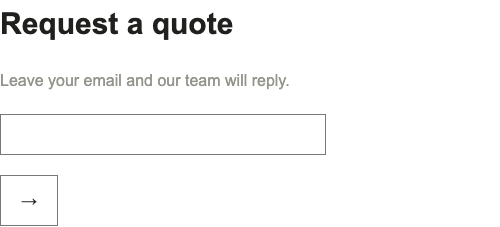
Before repair: faint instructions, an unlabeled email field and an arrow-only submit button.
Before / Tested local fixture
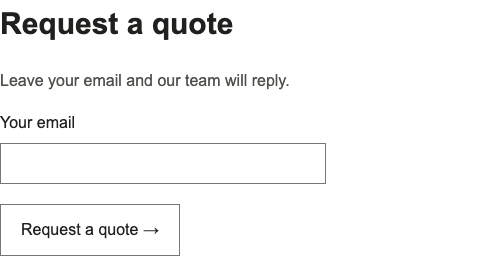
After repair: dark instructions, a visible email label and a button reading Request a quote.
After / Tested local fixture

label / Critical

The email field needs a name.

A person using a screen reader needs to know what information to enter. The original field had no associated label.

Before

<input id="email" type="email">

After

<label for="email">Your email</label>
<input id="email" type="email" autocomplete="email">

Retest result

The corrected input has the accessible name “Your email”. The label rule no longer fails.

button-name / Critical

The button needs to say what it does.

The arrow was hidden from assistive technology and the button had no remaining accessible name.

Before

<button><span aria-hidden="true">→</span></button>

After

<button>Request a quote
  <span aria-hidden="true">→</span>
</button>

Retest result

The corrected button exposes “Request a quote” as its accessible name. The button-name rule no longer fails.

color-contrast / Serious

The instructions need stronger contrast.

Light gray instructions on white were hard to read. The text color was changed while keeping the layout intact.

Before

color: #94948c;
background: #ffffff;

After

color: #50504c;
background: #ffffff;

Retest result

The darker instructions no longer fail the color-contrast rule in this fixture.

What this establishes.

axe-core 4.13.0 detected three rule failures in the original component and none in the corrected version, using its WCAG 2 A/AA and WCAG 2.1 AA tags. The fixture, script and JSON results are maintained with this site.

This small example does not establish full website conformance. A real engagement identifies the pages, customer journeys, testing methods, remaining findings and work outside scope.

Further checks include keyboard use, error recovery and the experience with a screen reader. W3C’s evaluation guidance explains why automated testing is only part of the work.

See what your website needs.

Start with a free automated check of five public pages.

Request my free scan